
DMR setup
PiStar hotspot settings
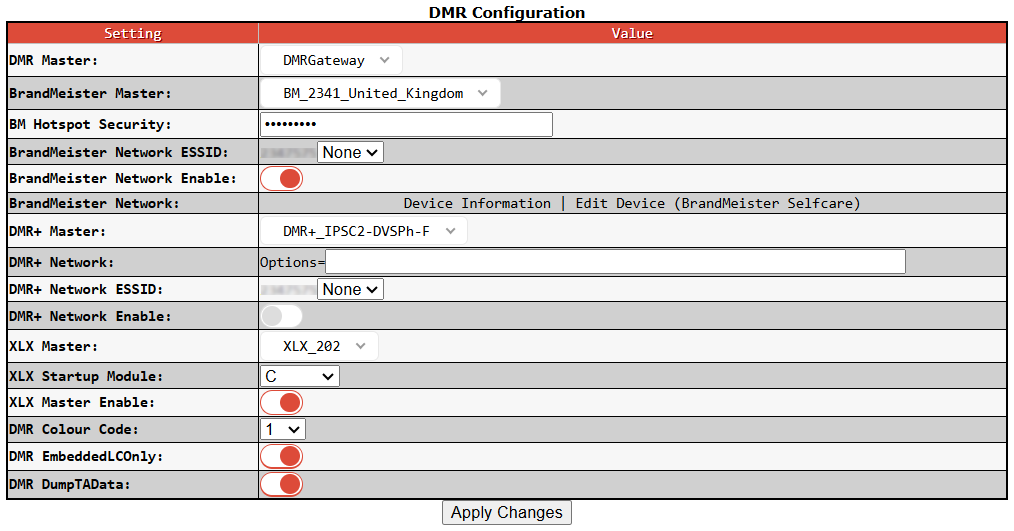
1) Set PiStar "DMR Master:" setting is set to "DMRGateway".
2) Set PiStar "XLX Master:" setting to which ever XLX reflector you want to connect to at startup, such as “XLX_202” for Stafford & Districts Amateur Radio Society Multi-protocol Digital Voice Reflector.
3) Set PiStar “XLX Startup Module:” to the default XLX module that you want to connect to. For club traffic using either a DMR or YSF radio I would suggest connecting to Module “C”.
4) Set PiStar “XLX Master Enable:” to active.
DMR radio settings
1) You will need to have a digital "Contact/Talk Group" setup with the following settings:
TG/DMR ID |
Name |
Call Type |
6 |
TG6-XLX |
Group Call |
2) You will need to have a “Receive Group Call List” setup with the following settings:
Group Name |
Group Contacts |
Contact |
XLX LOCAL |
1 |
TG6-XLX |
3) You will need to have a “Channel” setup with the following settings:
Channel Name |
Receive Frequency |
Transmit Frequency |
Channel Type |
Contact |
Receive Group List |
TG6-XLX |
<Match Radio Frequency in PiStar> |
<Match Radio Frequency in PiStar> |
D-Digital |
TG6-XLX |
XLX LOCAL |
To connect to the XLX202 reflector, initiate a private call to 68202
1) Select the “TG6 XLX” channel on your DMR radio.
2) On the Anytone series of handheld DMR radios, press and hold the “0” key until “Group call” is displayed.
3) Press the “#” key to switch from “Group call” to “Private call”.
4) Type in 68202.
5) Press the PTT for a couple of seconds.
Your PiStar hotspot should now audibly confirm that you are connected to the default module of the “XLX202” reflector.
To check which XLX reflector and module you are connected to, initiate a private call to 65000
1) Select the “TG6 XLX” channel on your DMR radio.
2) On the Anytone series of handheld DMR radios, press and hold the “0” key until “Group call” is displayed.
3) Press the “#” key to switch from “Group call” to “Private call”.
4) Type in 65000.
5) Press the PTT for a couple of seconds.
To change module
1) Select the “TG6 XLX” channel on your DMR radio.
2) On the Anytone series of handheld DMR radios, press and hold the “0” key until “Group call” is displayed.
3) Press the “#” key to switch from “Group call” to “Private call”.
4) Type 64001 through to 64026 to change between module “A” to “Z”.
5) Press the PTT for a couple of seconds.
Your PiStar hotspot should now audibly confirm that you are connected to the requested module of the “XLX202” reflector.
To disconnect from the XLX reflector, initiate a private call to 64000
1) Select the “TG6 XLX” channel on your DMR radio.
2) On the Anytone series of handheld DMR radios, press and hold the “0” key until “Group call” is displayed.
3) Press the “#” key to switch from “Group call” to “Private call”.
4) Type in 64000.
5) Press the PTT for a couple of seconds.
Your PiStar hotspot should now audibly confirm that you are still connected to the reflector but no module is specified. This indicates that you are now disconnected from any reflector module and therefore you are free to connect to other reflectors or talkgroups.
To simplify operation it is recommended that we setup the below additional “Contact/Talk Groups”, “Channels” and “Zones”:
Contact/Talk Groups
TG/DMR ID |
Name |
Call Type |
64000 |
TG64000-XLX-DISC |
Private |
64001 |
TG64001-XLX-MODA |
Private |
64002 |
TG64002-XLX-MODB |
Private |
64003 |
TG64003-XLX-MODC |
Private |
64004 |
TG64004-XLX-MODD |
Private |
64005 |
TG64005-XLX-MODE |
Private |
64006 |
TG64006-XLX-MODF |
Private |
64007 |
TG64007-XLX-MODG |
Private |
64008 |
TG64008-XLX-MODH |
Private |
64009 |
TG64009-XLX-MODI |
Private |
64010 |
TG64010-XLX-MODJ |
Private |
64011 |
TG64011-XLX-MODK |
Private |
64012 |
TG64012-XLX-MODL |
Private |
64013 |
TG64013-XLX-MODM |
Private |
64014 |
TG64014-XLX-MODN |
Private |
64015 |
TG64015-XLX-MODO |
Private |
64016 |
TG64016-XLX-MODP |
Private |
64017 |
TG64017-XLX-MODQ |
Private |
64018 |
TG64018-XLX-MODR |
Private |
64019 |
TG64019-XLX-MODS |
Private |
64020 |
TG64020-XLX-MODT |
Private |
64021 |
TG64021-XLX-MODU |
Private |
64022 |
TG64022-XLX-MODV |
Private |
64023 |
TG64023-XLX-MODW |
Private |
64024 |
TG64024-XLX-MODX |
Private |
64025 |
TG64025-XLX-MODY |
Private |
64026 |
TG64026-XLX-MODZ |
Private |
65000 |
TG65000-XLX-INFO |
Private |
68202 |
TG68202-XLX202 |
Private |
Channels
Channel Name |
Receive Frequency |
Transmit Frequency |
Channel Type |
Contact |
Receive Group List |
TG64000-XLX-DISC |
<Match Radio Frequency in PiStar> |
<Match Radio Frequency in PiStar> |
D-Digital |
TG64000-XLX-DISC |
XLX LOCAL |
TG64001-XLX-MODA |
<Match Radio Frequency in PiStar> |
<Match Radio Frequency in PiStar> |
D-Digital |
TG64001-XLX-MODA |
XLX LOCAL |
TG64002-XLX-MODB |
<Match Radio Frequency in PiStar> |
<Match Radio Frequency in PiStar> |
D-Digital |
TG64002-XLX-MODB |
XLX LOCAL |
TG64003-XLX-MODC |
<Match Radio Frequency in PiStar> |
<Match Radio Frequency in PiStar> |
D-Digital |
TG64003-XLX-MODC |
XLX LOCAL |
TG64004-XLX-MODD |
<Match Radio Frequency in PiStar> |
<Match Radio Frequency in PiStar> |
D-Digital |
TG64004-XLX-MODD |
XLX LOCAL |
TG64005-XLX-MODE |
<Match Radio Frequency in PiStar> |
<Match Radio Frequency in PiStar> |
D-Digital |
TG64005-XLX-MODE |
XLX LOCAL |
TG64006-XLX-MODF |
<Match Radio Frequency in PiStar> |
<Match Radio Frequency in PiStar> |
D-Digital |
TG64006-XLX-MODF |
XLX LOCAL |
TG64007-XLX-MODG |
<Match Radio Frequency in PiStar> |
<Match Radio Frequency in PiStar> |
D-Digital |
TG64007-XLX-MODG |
XLX LOCAL |
TG64008-XLX-MODH |
<Match Radio Frequency in PiStar> |
<Match Radio Frequency in PiStar> |
D-Digital |
TG64008-XLX-MODH |
XLX LOCAL |
TG64009-XLX-MODI |
<Match Radio Frequency in PiStar> |
<Match Radio Frequency in PiStar> |
D-Digital |
TG64009-XLX-MODI |
XLX LOCAL |
TG64010-XLX-MODJ |
<Match Radio Frequency in PiStar> |
<Match Radio Frequency in PiStar> |
D-Digital |
TG64010-XLX-MODJ |
XLX LOCAL |
TG64011-XLX-MODK |
<Match Radio Frequency in PiStar> |
<Match Radio Frequency in PiStar> |
D-Digital |
TG64011-XLX-MODK |
XLX LOCAL |
TG64012-XLX-MODL |
<Match Radio Frequency in PiStar> |
<Match Radio Frequency in PiStar> |
D-Digital |
TG64012-XLX-MODL |
XLX LOCAL |
TG64013-XLX-MODM |
<Match Radio Frequency in PiStar> |
<Match Radio Frequency in PiStar> |
D-Digital |
TG64013-XLX-MODM |
XLX LOCAL |
TG64014-XLX-MODN |
<Match Radio Frequency in PiStar> |
<Match Radio Frequency in PiStar> |
D-Digital |
TG64014-XLX-MODN |
XLX LOCAL |
TG64015-XLX-MODO |
<Match Radio Frequency in PiStar> |
<Match Radio Frequency in PiStar> |
D-Digital |
TG64015-XLX-MODO |
XLX LOCAL |
TG64016-XLX-MODP |
<Match Radio Frequency in PiStar> |
<Match Radio Frequency in PiStar> |
D-Digital |
TG64016-XLX-MODP |
XLX LOCAL |
TG64017-XLX-MODQ |
<Match Radio Frequency in PiStar> |
<Match Radio Frequency in PiStar> |
D-Digital |
TG64017-XLX-MODQ |
XLX LOCAL |
TG64018-XLX-MODR |
<Match Radio Frequency in PiStar> |
<Match Radio Frequency in PiStar> |
D-Digital |
TG64018-XLX-MODR |
XLX LOCAL |
TG64019-XLX-MODS |
<Match Radio Frequency in PiStar> |
<Match Radio Frequency in PiStar> |
D-Digital |
TG64019-XLX-MODS |
XLX LOCAL |
TG64020-XLX-MODT |
<Match Radio Frequency in PiStar> |
<Match Radio Frequency in PiStar> |
D-Digital |
TG64020-XLX-MODT |
XLX LOCAL |
TG64021-XLX-MODU |
<Match Radio Frequency in PiStar> |
<Match Radio Frequency in PiStar> |
D-Digital |
TG64021-XLX-MODU |
XLX LOCAL |
TG64022-XLX-MODV |
<Match Radio Frequency in PiStar> |
<Match Radio Frequency in PiStar> |
D-Digital |
TG64022-XLX-MODV |
XLX LOCAL |
TG64023-XLX-MODW |
<Match Radio Frequency in PiStar> |
<Match Radio Frequency in PiStar> |
D-Digital |
TG64023-XLX-MODW |
XLX LOCAL |
TG64024-XLX-MODX |
<Match Radio Frequency in PiStar> |
<Match Radio Frequency in PiStar> |
D-Digital |
TG64024-XLX-MODX |
XLX LOCAL |
TG64025-XLX-MODY |
<Match Radio Frequency in PiStar> |
<Match Radio Frequency in PiStar> |
D-Digital |
TG64025-XLX-MODY |
XLX LOCAL |
TG64026-XLX-MODZ |
<Match Radio Frequency in PiStar> |
<Match Radio Frequency in PiStar> |
D-Digital |
TG64026-XLX-MODZ |
XLX LOCAL |
TG65000-XLX-INFO |
<Match Radio Frequency in PiStar> |
<Match Radio Frequency in PiStar> |
D-Digital |
TG65000-XLX-INFO |
XLX LOCAL |
TG68202-XLX202 |
<Match Radio Frequency in PiStar> |
<Match Radio Frequency in PiStar> |
D-Digital |
TG68202-XLX202 |
XLX LOCAL |
I would suggest creating a zone named "Hotspot" that contains all reflectors and talkgroups etc. that you regularly use, including "XLX202" and the other channels that we use to manage our connection to the reflector:
Zone named "Hotspot":
Zone Channel Member |
TG6-XLX |
TG65000-XLX-INFO |
TG64000-XLX-DISC |
TG68202-XLX202 |
I would also suggest creating a zone named "XLX Modules" that contains all reflector modules and the other channels that we use to manage our connection to the reflector:
Zone named "XLX Modules":
Zone Channel Member |
TG6-XLX |
TG65000-XLX-INFO |
TG64000-XLX-DISC |
TG64001-XLX-MODA |
TG64002-XLX-MODB |
TG64003-XLX-MODC |
TG64004-XLX-MODD |
TG64005-XLX-MODE |
TG64006-XLX-MODF |
TG64007-XLX-MODG |
TG64008-XLX-MODH |
TG64009-XLX-MODI |
TG64010-XLX-MODJ |
TG64011-XLX-MODK |
TG64012-XLX-MODL |
TG64013-XLX-MODM |
TG64014-XLX-MODN |
TG64015-XLX-MODO |
TG64016-XLX-MODP |
TG64017-XLX-MODQ |
TG64018-XLX-MODR |
TG64019-XLX-MODS |
TG64020-XLX-MODT |
TG64021-XLX-MODU |
TG64022-XLX-MODV |
TG64023-XLX-MODW |
TG64024-XLX-MODX |
TG64025-XLX-MODY |
TG64026-XLX-MODZ |
Now to connect to the XLX202 reflector:
1) Select the “Hotspot” zone on your DMR radio.
2) Select the "TG68202-XLX202" channel.
3) Press the PTT for a couple of seconds. Your PiStar hotspot should now audibly confirm that you are connected to the default module of the “XLX202” reflector.
4) Select the "TG6-XLX" channel.
5) Press the PTT to talk via the default module of the "XLX202" reflector.
To check which XLX reflector and module you are connected to:
1) Select the “Hotspot” zone on your DMR radio.
2) Select the "TG65000-XLX-INFO" channel.
3) Press the PTT for a couple of seconds.
To change module
1) Select the “XLX Modules” zone on your DMR radio.
2) Select the appropriate channel that refers to the module that you want to switch to, such as "TG64003-XLX-MODC" to switch to module "C".
3) Press the PTT for a couple of seconds. Your PiStar hotspot should now audibly confirm that you are connected to the requested module of the “XLX202” reflector.
4) Select the "TG6-XLX" channel.
5) Press the PTT to talk via the selected module of the "XLX202" reflector.
To disconnect from the XLX reflector:
1) Select the “Hotspot” zone on your DMR radio.
2) Select the "TG64000-XLX-DISC" channel.
3) Press the PTT for a couple of seconds.
Your PiStar hotspot should now audibly confirm that you are still connected to the reflector but no module is specified. This indicates that you are now disconnected from any reflector module and therefore you are free to connect to other reflectors or talkgroups.
YSF setup
PiStar hotspot settings
1) Set PiStar "YSF Startup Host:" setting to which ever YSF reflector you want to connect to at startup, such as "YSF60202 - GB-XLX202C - GX3SBL Ref UK" for Stafford & Districts Amateur Radio Society Multi-protocol Digital Voice Reflector.
2) Set PiStar "UPPERCASE Hostfiles:" to enabled if your transceiver requires or supports this setting.
3) Set PiStar "WiresX Passthrough:" to enabled if your transceiver supports Wires-X functions.

YSF radio settings
You will need to have a channel programmed on your transceiver, with the following settings, that allows the transceiver to communicate with the hotspot.
YSF transceiver channel setup:
Setting | Value |
Channel name | Hotspot, or similar |
Channel type | Simplex |
Receive frequency | The same as the hotspot frequency |
Transmit frequency | The same as the hotspot frequency |
Mode | C4FM |
RF power | Minimal, ideally less than 1W |
Once your hotspot is powered up and your transceiver has the above channel selected you will be able to communicate with your hotspot and/or remote talkgroups, rooms and reflectors.
If your transceiver supports Wires-X then you should be able to use Wires-X functions to select, connect, search, list and disconnect from YSF rooms, such as "YSF60202 - GB-XLX202C - GX3SBL Ref UK" for Stafford & Districts Amateur Radio Society Multi-protocol Digital Voice Reflector. What, if any, Wires-X functions are supported by your radio and how to use them, should be covered within the appropriate manual of your transceiver.